mirror of
https://github.com/Microsoft/sql-server-samples.git
synced 2025-12-08 14:58:54 +00:00

1.2 KiB
1.2 KiB

How to Enable Azure Dashboard for ARC SQL
This article will show you how to use the SQL Server Instances.json file to create a custom dashboard in the Azure portal.

Steps to Follow
- Log in to Azure Portal
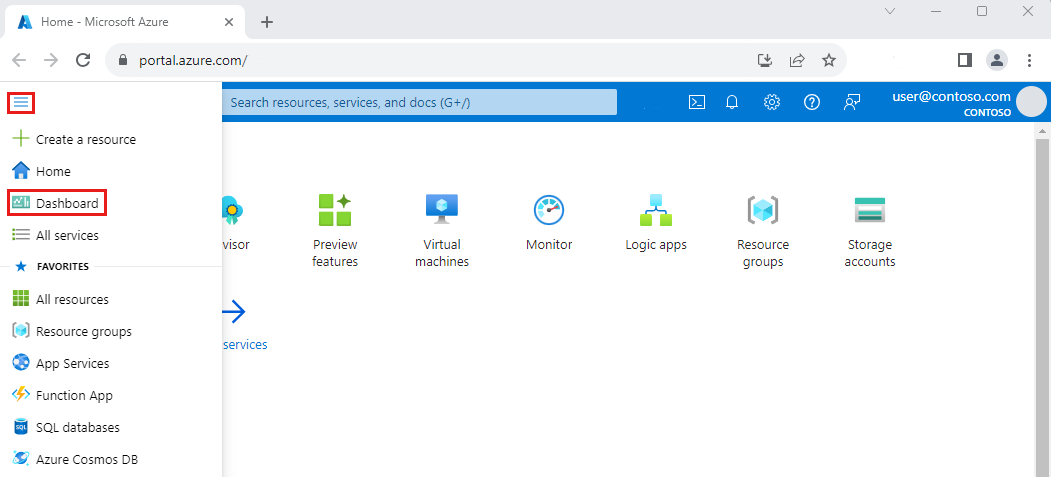
- Click on Dashboard from the Azure Portal menu. You may already see the dashboard view by default.
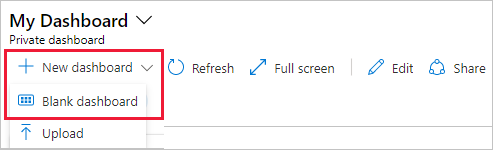
- Choose Upload.
- If you want to edit the dashboard, please refer to this link.
Disclaimers
The code included in this sample is not intended to be a set of best practices on how to build scalable enterprise grade applications. This is beyond the scope of this quick start sample.